Is your internet slow? Do you live far from town? You are not alone. Many people in St. Ann, Westmoreland, and other rural spots deal with weak Wi-Fi every day.
Starlink can fix this. It beams internet down from space. No cables. No towers. Just a small dish on your roof.
But here’s the thing: Starlink in Jamaica has changed a lot in 2026. Prices went up. And new signups are not as easy as they used to be. This guide gives you the real, current facts.
What Is Starlink, in Plain Words?
Starlink is internet from space. It comes from SpaceX, the rocket company run by Elon Musk.
Old satellite internet used big satellites far above Earth. They sat about 22,000 miles up. This made the signal slow and laggy.
Starlink is different. It uses thousands of small satellites. They fly much closer, about 340 miles up. This means faster speeds and less lag.
What you get with Starlink:
- Download speeds of 50 to 220 Mbps
- Upload speeds of 10 to 20 Mbps
- Lag as low as 20 to 40 milliseconds
- No data caps on most plans
That’s fast enough for video calls, school, work, and Netflix. Even in a spot with no cable line.
Can You Get Starlink in Jamaica Right Now?
Here’s the part most guides skip. As of mid-2026, Starlink hit its capacity limit for new residential users in Jamaica.
Too many people signed up. The network got full. If you try to order now, you may see this message:
“No services are available at this address. Please try a different address.”
This does not mean Starlink stopped working. Current users still have service. It just means new signups are on a waitlist until SpaceX adds more satellites over the island.
What you can do right now:
- Check your address on the Starlink website’s coverage map.
- If it says “waitlist,” you can join and pay a small deposit (around JMD $8,500) to hold your spot.
- Look into the Business plan, which is still open for new users in many areas, though it costs more per month.
- Check back often. Spots can open with little warning once SpaceX launches more satellites.
Buying a Starlink kit from a local shop does not skip the line. The capacity limit is about the network, not the hardware.
How Much Does Starlink Cost in Jamaica in 2026?
Prices went up in 2026. Here is the real, current cost.
| Item | Cost (JMD) | Notes |
|---|---|---|
| Starlink kit (dish, router, cables) | Approx. $63,000+ | Bought direct from Starlink |
| Shipping and handling | Approx. $3,000 | Added at checkout |
| Local reseller kit | $85,000–$95,000 | Faster, but pricier |
| Monthly residential plan | $7,450 | Went up from $7,000 in June 2026 |
| Monthly business plan | Approx. $7,600+ | Faster priority data |
| Waitlist deposit | Approx. $8,500 | Refundable, holds your spot |
Starlink raised its residential price by 6.4%, moving from JMD $7,000 to JMD $7,450 a month. This change started with billing cycles on or after June 18, 2026. The company says it needs the extra funds to grow network capacity across the island.
Starlink vs. Flow vs. Digicel: Quick Cost Look
You may be torn between Starlink and a local plan. Here’s a simple side-by-side.
| Feature | Starlink | Flow Fiber | Digicel Home |
|---|---|---|---|
| Monthly cost | ~JMD $7,450 | ~JMD $4,000–$7,000 | ~JMD $3,500–$6,500 |
| Works in rural areas | Yes | Limited | Limited |
| Setup cost | High (kit cost) | Low, often free | Low, often free |
| Storm reliability | Good (self-powered options) | Poor (cable lines can snap) | Fair |
| Speed cap | None on most plans | Varies by plan | Varies by plan |
If cable or fiber reaches your house, it’s often cheaper month to month. But if you live off the main road, Starlink may be your only fast option.
How to Order Starlink in Jamaica?
Ordering is simple, once a spot is open in your area.
- Go to the Starlink website and type in your address.
- Check if your area shows “Available” or “Waitlist.”
- If available, pick your plan and pay.
- Track your box through DHL.
- Pick up your kit or wait for delivery.
- Set it up yourself, or book a local installer.
Getting Your Kit Through DHL
Starlink ships kits into Jamaica through DHL. This part trips a lot of people up.
If you have a full street address, DHL may drop the box right at your door.
But many homes in Jamaica don’t have that kind of address. In that case, your kit goes to the nearest DHL pickup point instead. Common spots include Half Way Tree in Kingston and the Montego Bay office.
DHL will call or text you once your box lands. Then you head over, sign for it, and take it home.
Timeline to expect:
- 1–2 weeks for kits with a full address
- 3–6 weeks if customs needs extra checks
What’s Inside the Box?
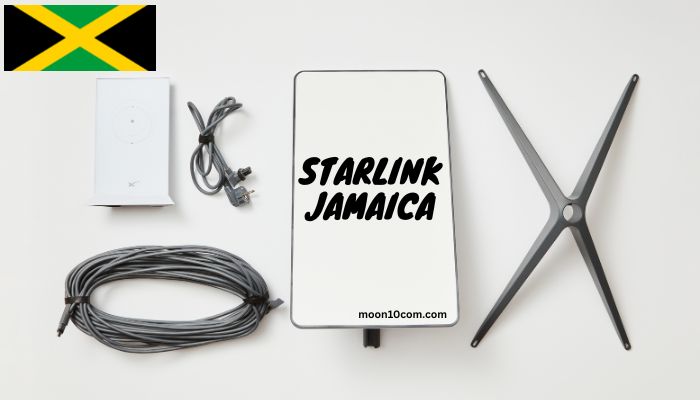
Your Starlink kit weighs about 15 pounds. Here’s what’s inside:
- The dish (terminal): A flat panel about 15 inches wide. It’s weatherproof and finds satellites on its own. No motor needed to tilt it.
- Gen 3 Wi-Fi router: Covers up to 3,200 square feet. Has two Ethernet ports built in, so you can wire a TV or desktop with no extra adapter.
- Kickstand or base: For mounting on the ground or a roof.
- 50-foot cable: Links the dish to the router. Long enough to run through walls or across your yard.
- Power cable: Plugs into any normal wall outlet.
Read: UTech Moodle Login Guide 2026: App, Setup & Fixes (UTechOnline)
How to Set Up Starlink (Step by Step)?
You can set this up yourself in under an hour, in most cases.
- Download the Starlink app. Scan the QR code in the box.
- Plug in the cables. Connect the dish cable to the router’s port marked with an antenna icon. Then plug the router into power.
- Find open sky. Your dish needs a clear view above it. Trees, poles, and roofs can block the signal. Use the app’s obstruction tool to check your spot.
- Let it connect. The app will guide you through alignment. It’s automatic.
- Join the Wi-Fi. Connect to the “STARLINK” network shown in your Wi-Fi list. Then set your own network name and password.
Once you’re set up, run a speed test. You should see 150 to 250 Mbps with about 25ms of lag.
DIY Setup or Hire a Pro?
Both work. It comes down to your time and your roof.
DIY makes sense if:
- Your roof is easy to reach
- You have a clear, open view of the sky
- You don’t mind climbing a ladder and testing angles
A pro install makes sense if:
- Your roof is steep or hard to access
- Trees or hills block your view in most spots
- You want the mount secured to survive hurricane winds
- You need help wiring a mesh network through the house
A bad mount can mean a weak signal or a dish that falls in a storm. Many people pay for install just for that peace of mind.
Tips to Get the Best Starlink Speed
A few small choices make a big difference in your signal:
- Mount high. A roof or pole beats ground level almost every time.
- Face south, not north. Most Jamaica installs get the best signal with a clear southern sky view.
- Trim nearby branches. Even a small branch can cause brief dropouts.
- Use the app’s obstruction scan before you drill a single hole.
- Add a surge protector. Jamaica’s storm season brings power spikes that can harm your router.
- Space out smart devices. Too many devices on one router can slow things down. A mesh add-on helps in larger homes.
Is Starlink Right for You?
Starlink works best if you:
- Live outside Flow or Digicel’s fast, wired zones
- Deal with frequent outages on your current plan
- Need strong speed for work, school, or streaming
- Have a clear view of open sky
Think twice if you:
- Can already get fast, wired fiber for less money
- Live in a spot boxed in by hills or tall trees
- Aren’t ready for the upfront kit cost
Frequently Asked Questions
Is Starlink available in all of Jamaica? Most of the island has coverage. But as of 2026, new residential signups may be on a waitlist due to network capacity limits. Check your address on the coverage map first.
How much does Starlink cost per month in Jamaica? As of June 2026, the residential plan costs JMD $7,450 per month. Business plans start near JMD $7,600 per month.
Do I need Wi-Fi already to use Starlink? No. Starlink creates its own Wi-Fi network through its router. You don’t need any other internet service.
Can I move my Starlink kit to a new house? Yes, but your service may need to reactivate at the new address, and you could hit the waitlist again if that area is full.
Does rain affect Starlink in Jamaica? Heavy rain can cause short dropouts, known as rain fade. The Gen 3 dish handles most storms well and can even melt light debris off itself.
How long does delivery take? Usually 1 to 2 weeks with a full address. It can stretch to 3 to 6 weeks if customs needs more checks.
Can I use Starlink for a business or Airbnb? Yes. Many Airbnb hosts in Jamaica use Starlink for guest Wi-Fi. A business plan can offer more stable speeds during busy hours.
Is professional installation worth the cost? If your roof is hard to reach, or you want a mount that can survive hurricane winds, yes. It saves time and lowers the risk of a weak or unsafe setup.